GST ARN Status
Check GST ARN status online without login. Track your GST registration by ARN number, understand every status, and fix a stuck application. Free guide.


2000
Happy Clients

1500
Expert Advisors

2+
Branch Offices
Free Consultation by Expert
.png)


.png)
.png)
Check GST Registration Status Online
If you have applied for GST and are waiting, the only thing that tells you where your file has reached is your ARN. You do not need to log in anywhere. Open the GST portal, go to Track Application Status, put in your ARN, and the portal shows you the current stage of your application.
This page explains how to check GST ARN status, what each status on the screen actually means, how long each stage normally takes, and what to do when your application gets stuck. If you have not applied yet, start from our GST registration page instead.

Expertise in GST ARN Status

Enquiry Form
Among Asia Top
100
Consulting Firm

Get Consultation
Lowest Fees
100,000 + Clients.

Service Delivery
4.9 Customers Rating
50+ Offices
Contact us today to schedule your appointment.
You can call us on +919953004880 or write to us at info@efilingcompany.com
What Is an ARN in GST
ARN stands for Application Reference Number. The GST portal generates it automatically the moment you finish submitting your registration application with DSC or EVC. It is a 15-character code and it looks something like AA0704250000XXX.
Two things are worth knowing about the ARN:
- It is proof that your application actually reached the department. If you have an ARN, your file exists in the system.
- It is not a GST number. You cannot raise a tax invoice on an ARN, you cannot collect GST on it, and buyers cannot claim input tax credit against it. That only starts once your GSTIN is issued.
The portal sends the ARN to the email address and mobile number you entered in the application. If you cannot find it, check your spam folder first, because GST portal mails land there often.
Reading Your ARN Number
The 15 characters are not random. The first two are letters, the next two tell you the state code of the jurisdiction handling your file, then comes the month and year of submission, and the rest is the running serial number with a check character at the end.
You do not need to decode it. But it is useful to know that the state portion tells you which state authority your application went to, which matters if you applied in one state while sitting in another.
How to Check GST ARN Status Online
There are two ways to check ARN status in GST. One works without login, the other needs your GST portal credentials. Most people should use the first one.
Method 1: Check GST Status by ARN Without Login
This is the fastest route and it works even if you have never logged in to the GST portal.
- Go to www.gst.gov.in
- Click on Services, then Track Application Status
- In the Module dropdown, select Registration
- Choose ARN as the search type
- Enter your 15-character ARN number
- Type the captcha and click Search
The screen shows your current stage, the date it was submitted, and the date the status last changed. That last date is the one worth noting, because it tells you how many days your file has been sitting at the same stage.
Method 2: Track GST Application Status After Login
If you already have GST portal credentials, log in and go to Services, then Track Application Status. Pick the module and search by ARN, SRN, or by submission date.
The logged-in view gives you more than the public one. You can see the full history of the application, download the registration certificate once it is approved, and file your clarification reply from the same place if the officer has raised a query.
Checking Status Before You Get an ARN
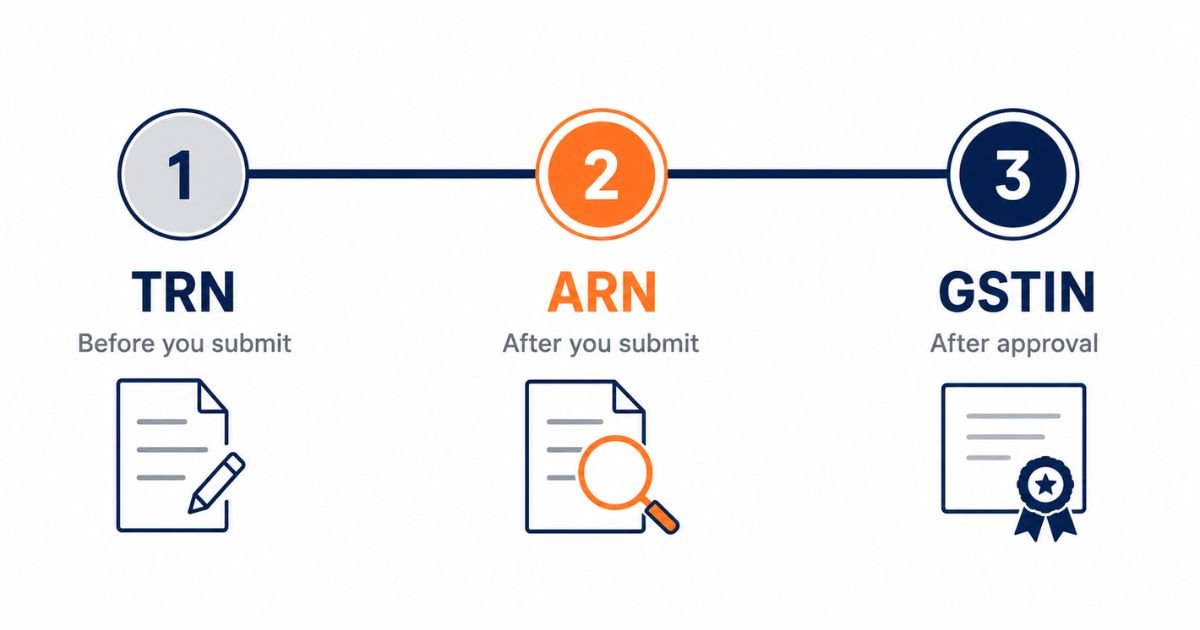
If you have only completed Part A of the registration form and not yet submitted Part B, you will not have an ARN. What you will have is a TRN, or Temporary Reference Number, which is also 15 characters.
To use it, go to Services, then Registration, then New Registration, and select the TRN option instead of New Taxpayer. Enter the TRN, complete the OTP, and you land back inside your saved draft application.
The TRN is only meant for that gap between starting and submitting. Once you submit and the ARN is generated, the TRN stops being useful. People confuse the two constantly and then think something has gone wrong. Nothing has gone wrong. You have simply moved to the next stage.
| Number | When you get it | What it is used for |
| TRN | After completing Part A, before submitting the full application | To return to your saved draft and finish Part B |
| ARN | The moment you submit the completed application | To track your application status until a decision is taken |
| GSTIN | Only after the officer approves your application | Your permanent GST number, used on invoices and returns |
GST ARN Status Meaning - What Each Status Tells You
This is where most people get worried without needing to. Below is what the common statuses mean and what you should actually do about each one.
| Status on portal | What it means | What you should do |
| Pending for Processing | Your application has reached the officer and is waiting to be looked at. No query has been raised. | Nothing. Just wait. This is the normal first status for every application. |
| Pending for Clarification | The officer has raised a query and issued a notice. Your clock is now running. | Log in, read the notice, and file your reply within the time allowed. Do not ignore this. |
| Clarification Filed - Pending for Order | You replied and the officer is reviewing your reply. | Wait. The officer now has to pass an order on your reply. |
| Clarification Not Filed - Pending for Order | The reply window closed without a reply from you. Rejection is likely. | Check whether the window is truly over. If it is, prepare to apply again with corrected documents. |
| Site Verification Assigned | Your case has been marked for physical verification of the business premises. | Keep the premises accessible and your original documents ready. Someone should be available at the address. |
| Site Verification Completed | The visit is done and the report has gone back to the officer. | Wait for the decision. |
| Approved | Your registration is granted and your GSTIN has been issued. | Log in and download your certificate in Form GST REG-06. |
| Rejected | The officer has refused the application and passed an order giving reasons. | Read the rejection order carefully, fix the actual problem, and file a fresh application. |
| Withdrawn | The application was withdrawn by the applicant. | Nothing further happens on this ARN. A new application is needed. |
VERIFY: the exact wording of each status label should be confirmed against a live Track Application Status screen before publishing, since portal wording is updated from time to time.
GST ARN Status Pending for Processing
This is the status almost everyone sees first, and it causes the most unnecessary worry. It simply means your file is in the queue.
It is not a problem. It is not a rejection. It is not an error. It means the department has your application and nobody has raised a question on it yet, which is the position you want to be in.
What people find hard is that this status does not change daily. It can sit unchanged for several working days and then jump straight to Approved. Refreshing the page every few hours will not speed it up.
Where it does become worth acting on is when the status has not moved for an unusually long stretch and the last-updated date on the portal has not shifted at all. At that point it is reasonable to reach the jurisdictional office through the details on your application acknowledgement, or to raise a grievance through the GST self-service portal.
GST ARN Status Pending for Clarification
Of every status on this page, this is the only one that puts a deadline on you. Everything else is you waiting on the department. This one is the department waiting on you.
It means the officer looked at your file and was not satisfied with something in it. A notice is issued in Form GST REG-03 setting out what the officer wants. The usual reasons are ordinary document problems rather than anything serious:
- The address proof does not clearly match the address entered in the application
- The rent agreement or electricity bill is unclear, expired, or in a different name without a supporting NOC
- The name on the PAN does not match the name entered for the business or the promoter
- The photograph or signature is not clear enough
- The nature of business shown does not match the documents submitted
Your reply goes in Form GST REG-04. Log in, go to Services, then Registration, then Application for Filing Clarifications, enter your ARN, answer what has been asked, upload the corrected document, and submit with DSC or EVC.
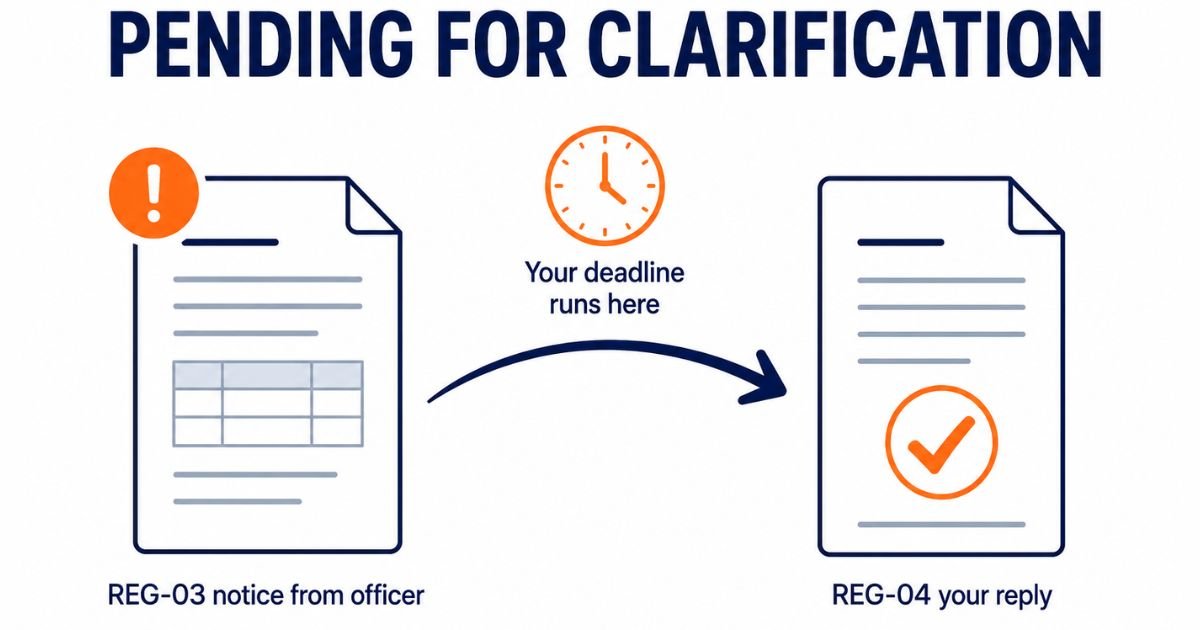
Two things to be careful about. First, answer the specific question asked rather than uploading everything again. Second, do not let the reply window lapse. If it closes without a reply, the status becomes Clarification Not Filed - Pending for Order, and from there the file usually ends in rejection and you start over.
Site Verification and Physical Visits
Not every application goes for physical verification, and there is no way to know in advance whether yours will. When it happens, the status changes to Site Verification Assigned.
This adds time to your registration. It also means an officer may visit the business address you have declared. Keep the signage in place, keep your original documents at the premises, and make sure someone who can answer basic questions about the business is available.
How Long Does GST ARN Status Take to Change
The honest answer is that it depends on whether your file is picked up for verification, and nobody can promise you a date.
What we can tell you is what usually happens. The table below is based on the pattern we see across applications we file, not on any timeline fixed by law. Treat it as a rough guide.
| Stage | What usually happens |
| ARN generated after submission | Immediately, along with an email and SMS |
| Straightforward application, no queries | Approved within a few working days |
| Application with a clarification notice | Add the time you take to reply, plus the officer's review time after that |
| Application marked for site verification | Noticeably longer, since it depends on the visit being scheduled and completed |
VERIFY: before publishing, add a short section on Rule 14A, the risk-based route notified through Notification 18/2025-CT with effect from 1 November 2025, which provides a shorter approval timeline for eligible applicants. The exact conditions and threshold must be confirmed against the notification text before any figure is stated here. No competitor page currently covers this, so it is worth getting right.
One thing worth saying plainly, because a lot of pages online avoid it. Applications from a first-time applicant, from a residential address, or with a rented premises and a weak paper trail tend to attract more scrutiny than an established business applying from a commercial address. That is not a rule written anywhere. It is simply the pattern.
Common Problems When Checking GST ARN Status
ARN Not Found or Invalid ARN
Almost always a typing problem. The ARN mixes letters and digits, and the usual culprits are the digit 0 entered as the letter O, and the digit 1 entered as the letter I. Copy the ARN straight from your acknowledgement email rather than typing it from a screenshot.
If the ARN is definitely correct and still shows nothing, check that you selected Registration in the Module dropdown. Searching under the wrong module returns nothing even when the ARN is right.
You Never Received the ARN
Check spam first. If it is genuinely not there, log in with your TRN and look at your submitted application, or use the Track Application Status page with the submission date option instead of the ARN option.
If the email address or mobile number entered in the application was wrong, that is a harder problem, because the portal sends everything to those details. This is worth getting professional help with rather than trying to fix it yourself.
Status Has Not Moved for Weeks
First check the last-updated date rather than the status itself. Sometimes the stage name stays the same while the date has moved, which means something did happen.
If the date genuinely has not shifted for a long time, raise a grievance through the GST self-service portal with your ARN, or contact your jurisdictional office directly.
Status Says Approved but the Certificate Is Not Downloading
The certificate in Form GST REG-06 becomes available in the logged-in section under Services, then User Services, then View or Download Certificates. It sometimes takes a short while after approval before it appears. If it is not there after a day, log out and back in before assuming something is wrong.
ARN Status for Other GST Applications
ARNs are not only for new registration. The portal generates one for almost every application you file, and the Track Application Status page handles all of them once you pick the right module.
- Amendment ARN. Generated when you change core details such as the business address, the legal name, or the promoter details. Core amendments need officer approval, so they carry a status the same way a new registration does. Non-core changes usually go through on their own.
- Cancellation ARN. Generated when you apply to cancel your registration. It moves through its own stages until the cancellation order is passed.
- Refund ARN. Generated when you file a refund application. This is tracked under the Refunds module, not Registration, which is why searching for it under Registration returns nothing.
- Return filing ARN. Generated each time you successfully file a return. This one is an acknowledgement rather than something awaiting approval.
If you are checking a cancellation or a refund and the search comes back empty, the module dropdown is the first thing to check.
What Happens After Your ARN Status Shows Approved
Approval is not the finish line. Two things need attention straight away.
Download your certificate. Form GST REG-06 is available in your logged-in dashboard. A copy has to be displayed at your principal place of business, and the GSTIN needs to be shown on the signboard at your premises.
Furnish your bank account details. Under Rule 10A, bank account details have to be given on the portal within thirty days of registration, or before filing the first statement of outward supplies, whichever is earlier. This is the one that catches people out. They get the GSTIN, start invoicing, and forget the bank detail step entirely.
After that, your return filing obligations start from the date of registration, whether or not you have made a single sale. A nil return is still a return.
Get Help With a Stuck GST Application
If your ARN has been sitting on the same status for weeks, or you have received a clarification notice and are not sure how to answer it, we can look at it for you. We handle GST registration end to end, including clarification replies and re-applications after rejection.
Call +91 99530 04880 or write to info@efilingcompany.com with your ARN and we will tell you where your file actually stands.