Online Company Registration in India
How to Register Your Company Online on the MCA Portal, Fully Online in 7 to 10 Days


2000
Happy Clients

1500
Expert Advisors

2+
Branch Offices
Free Consultation by Expert
.png)


.png)
.png)
How to get online company registration in india
Online company registration in India is now genuinely simple. The entire process runs on the government's MCA portal, you never have to visit any office, and most companies are registered within 7 to 10 working days. Everything, from reserving your name to getting your Certificate of Incorporation, happens on your computer.
The whole registration is handled through a single online form called SPICe+, which does almost everything in one go. This page explains how the online process actually works, and answers the two questions most founders have: can I do this myself on the government website, and what does the online journey really look like from start to finish.
If you are still deciding on the structure, start with our Private Limited Company Registration guide. For the full step by step, see our company registration process page.

Expertise in Online Company Registration in India

Enquiry Form
Among Asia Top
100
Consulting Firm

Get Consultation
Lowest Fees
100,000 + Clients.

Service Delivery
4.9 Customers Rating
50+ Offices
Contact us today to schedule your appointment.
You can call us on +919953004880 or write to us at info@efilingcompany.com
How the MCA Online Portal Works
Let us clear up the biggest confusion first, because most guides skip it. All company registration in India happens on one government website, the MCA portal at mca.gov.in, now running on its newer version called MCA V3. You do not deal with five different websites anymore. It is all in one place.
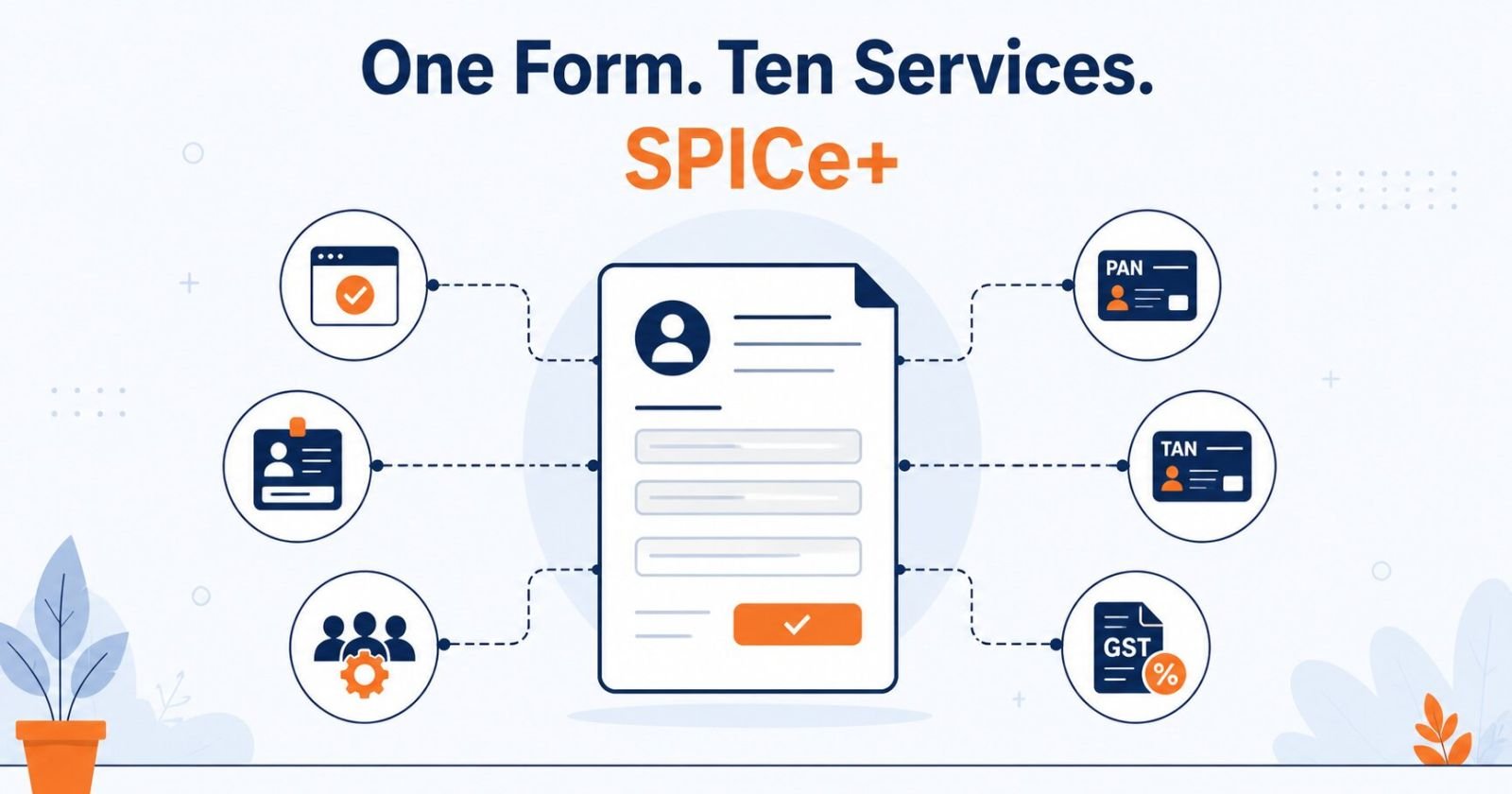
The heart of it is a single form called SPICe+ (the short name for Simplified Proforma for Incorporating Company Electronically Plus). This one form bundles ten different services together, including your name reservation, the incorporation itself, your DIN, PAN, TAN, and optional GST, EPFO, and ESIC registration. Here is how you use it:
- You create a user login on the MCA portal.
- You file SPICe+ Part A to reserve your company name.
- You file SPICe+ Part B to actually incorporate the company.
- You attach your Class 3 Digital Signature Certificate to sign everything.
- You pay the fees and stamp duty online.
That is the online process in a nutshell. What used to take weeks and multiple government offices now happens through one form on one website.
How to Check Your Company Name Online (MCA21)
Before you commit to a name, check it is free. You can search for name availability directly on the MCA portal, and it is smart to also cross-check it as a trademark on the IP India website, because a name that MCA approves can still be blocked later by a trademark owner. One thing to remember: once your name is reserved through SPICe+ Part A, it stays reserved for 20 days. If you do not file Part B within that window, the name lapses and you start again, so keep the two steps close together.
The Online Registration Process, Step by Step
Here is what the online journey actually looks like, from the day you decide to the day your company exists. Every step happens on the portal.
- Get a Class 3 DSC for each director. This is your digital signature to sign the forms online, and it usually comes through in one to two days.
- Reserve your company name on the portal through SPICe+ Part A.
- Prepare the MOA and AOA, your company's two founding documents, which are filed online as e-MOA and e-AOA.
- File SPICe+ Part B along with AGILE-PRO-S and INC-9 on the portal.
- Pay the fees and stamp duty online, using net banking or a card.
- Download your Certificate of Incorporation from the portal, with your CIN, PAN, and TAN attached.
To keep it simple, here is roughly how the days fall:
| Day | What Happens Online |
| Day 1 to 2 | DSC issued and company name reserved |
| Day 3 to 5 | MOA, AOA, and SPICe+ Part B filed on the portal |
| Day 7 to 10 | Certificate of Incorporation downloaded, with CIN, PAN, and TAN |
Want the full explanation of each step? Our company registration process guide walks through every stage in detail.
Can You Register a Company Online for Free?
This one deserves a straight answer, because a lot of ads suggest it is free when it is not. The MCA filing fee is genuinely ₹0 for authorised capital up to ₹15 lakh, which covers most new startups, so the government part really is free. But you still have to pay for your Class 3 DSC and your state stamp duty. So even doing everything yourself on the portal, expect a small unavoidable cost, usually a few thousand rupees for the DSC and stamp duty together. Nobody registers a company for truly zero rupees.
Doing It Yourself on the Government Website vs Using a Service
Yes, you can absolutely register your company yourself on mca.gov.in. The portal is open to everyone, and if you do it yourself you only pay the government costs. Many founders take this route, and there is nothing wrong with it.
Here is the honest catch, though. The parts that trip people up are the MOA and AOA drafting, the object clause, and getting the stamp duty right. These are exactly where the MCA rejects applications. And a rejection is not just a delay, it means re-paying the non-refundable fees and doing parts of it again. So while doing it yourself looks cheaper, one mistake can cost more than a professional would have. Most founders use a service to get it right the first time and skip the stress. Either way, now you know both options honestly.

Good to Know About the MCA V3 Portal
A few practical things about the portal that almost nobody tells you, and that will save you a headache:
- The portal moved from the old version (V2) to the newer MCA V3 system, so older guides you find online may look different from what you see.
- It is built for a computer. Filing forms that need a digital signature does not work properly on a mobile phone, so use a laptop or desktop.
- Chrome or Edge on a computer tend to work best.
- You pay by net banking or card. UPI is not supported on the portal's payment gateway yet, so keep that in mind.
- A reserved name is valid for 20 days, so do not reserve your name too early before your documents are ready.
These small details change from time to time as the portal is updated, so if something looks different when you log in, that is normal.
Your MCA Certificate of Incorporation, Downloaded Online
Once your application is approved, the Registrar of Companies issues your Certificate of Incorporation (COI) right on the MCA portal, and you simply download it as a PDF. This is your proof that the company legally exists. It carries your CIN (the company's unique number), and your PAN and TAN come attached to it automatically. That means you do not apply for PAN and TAN separately, they arrive with the certificate.
What You Need and What It Costs
Two quick summaries so you know what to keep ready, with links to the full guides if you want the detail.
Documents. You need identity and address proof for the directors and shareholders (PAN, Aadhaar, a photo, and recent address proof), plus proof for your registered office (a recent utility bill and an owner NOC). For the complete checklist, see our documents required guide.
Cost. The MCA filing fee is zero up to ₹15 lakh authorised capital. Your real costs are your DSC (around ₹1,500 to ₹2,500 per director) and your state stamp duty, plus professional fees if you use a service. For the full honest breakdown, see our pvt ltd registration cost guide.
Which Business Type Can You Register Online?
The same MCA portal handles all the main business structures, so you are not limited to one. You can register a Private Limited Company, an LLP, a One Person Company, and others, all online. For most startups that want to grow and raise funding, the Private Limited Company is the popular choice, which is why this guide focuses on it. To compare the options properly, see our Private Limited Company Registration page.
Common Mistakes in Online Registration
Most online applications that get rejected fail for a small handful of reasons. Watch out for these:
- Choosing a name that is already taken or too similar to an existing company or trademark
- Getting the object clause wrong in the MOA, so your company cannot legally do what you plan
- Uploading blurry or mismatched documents, for example an address proof that does not match the PAN
- Forgetting the DSC or using the wrong one at the signing step
- Paying the wrong stamp duty amount, which holds up the whole application
Why Register Your Company with eFilingCompany
You can do it yourself on the portal, and we will always be honest about that. But if you would rather have it done quickly and without rejections, here is what we bring:
- A fully online process, so you never have to visit an office
- We handle the entire MCA portal filing for you, start to finish
- Transparent pricing, with honest guidance on your state's stamp duty
- Qualified CA and CS support, so your application does not bounce back
- Complete post-registration support through your important first-year deadlines
Ready to register your company online? Call us at +919953004880 or reach out online, and our team will handle the whole MCA filing for you, from name reservation to your Certificate of Incorporation.